MTD Software for UK Landlords | HMRC Recognised
This site uses cookies. By continuing to browse the site you are agreeing to our use of cookies. To find out more about cookies on this website and how to delete cookies, see our privacy notice.
Analytics

Tools which collect anonymous data to enable us to see how visitors use our site and how it performs. This includes services such as Google Analytics and Microsoft Clarity, and we use this data to improve our products, services and user experience.

Marketing

Tools that help us measure ad performance and show relevant campaigns. This includes Google Ads and Microsoft Advertising (UET), plus affiliate attribution data that recognises orders referred by partners.

Essential

Tools that enable essential services and functionality, including identity verification, service continuity and site security.

HMRC Recognised Software

Making Tax Digital for Income Tax is Here

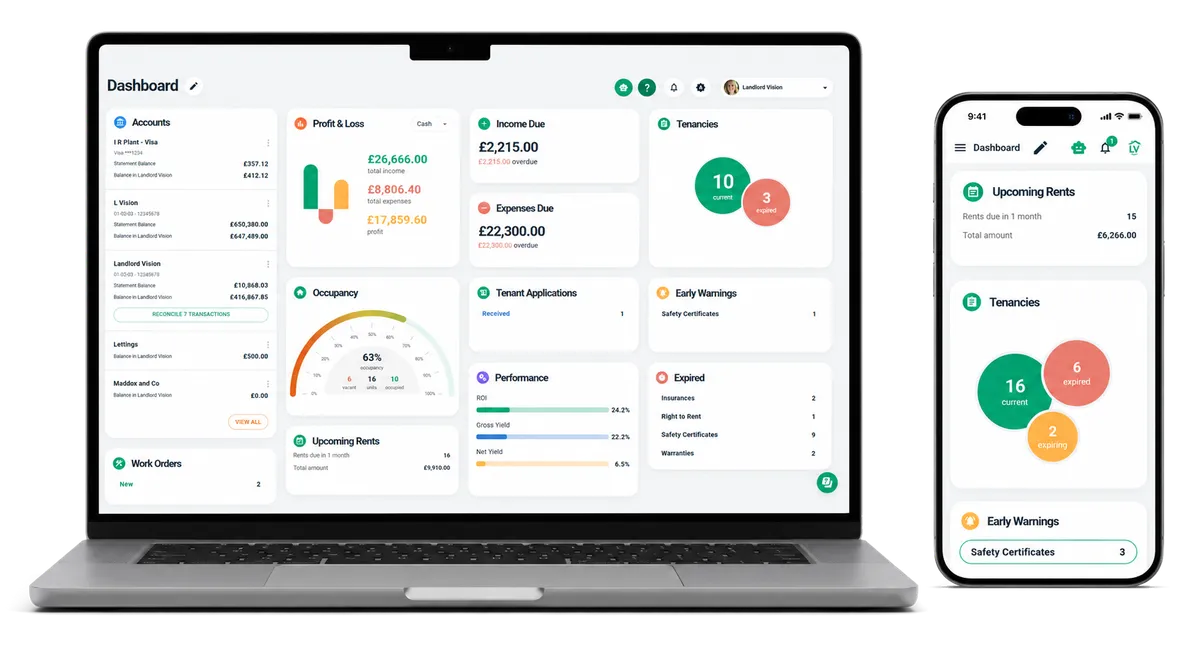
Landlord Vision is officially recognised by HMRC for Making Tax Digital. Connect to HMRC, submit quarterly updates, and file your final declaration — all without leaving the platform.
HMRC Recognised — MTD
HMRC Recognised
FCA Registered
Trusted by Thousands of UK Landlords
Rated Excellent on Trustpilot
How It Works

The MTD Journey in Landlord Vision

From connecting to HMRC to filing your final declaration, here's how Landlord Vision handles each stage of the MTD process for you.

1

Connect to HMRC

Authorise Landlord Vision to communicate with HMRC on your behalf. It's a one-time secure connection using HMRC's Government Gateway credentials — the same login you already use for Self Assessment.

Once connected, Landlord Vision can send and receive data directly with HMRC.
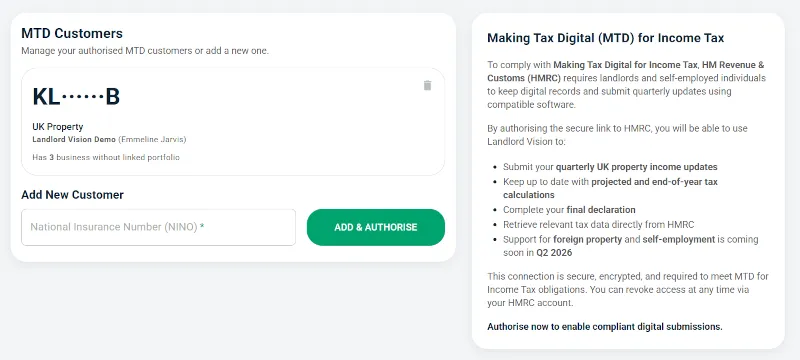
Screenshot: Connect to HMRC in Landlord Vision
2

Map Your Businesses to Portfolios

HMRC treats each income source as a separate "business." In Landlord Vision, you map these HMRC businesses to your property portfolios so the right income and expenses flow into the correct quarterly submission.

If you have both UK and overseas properties, each is mapped as a separate business.
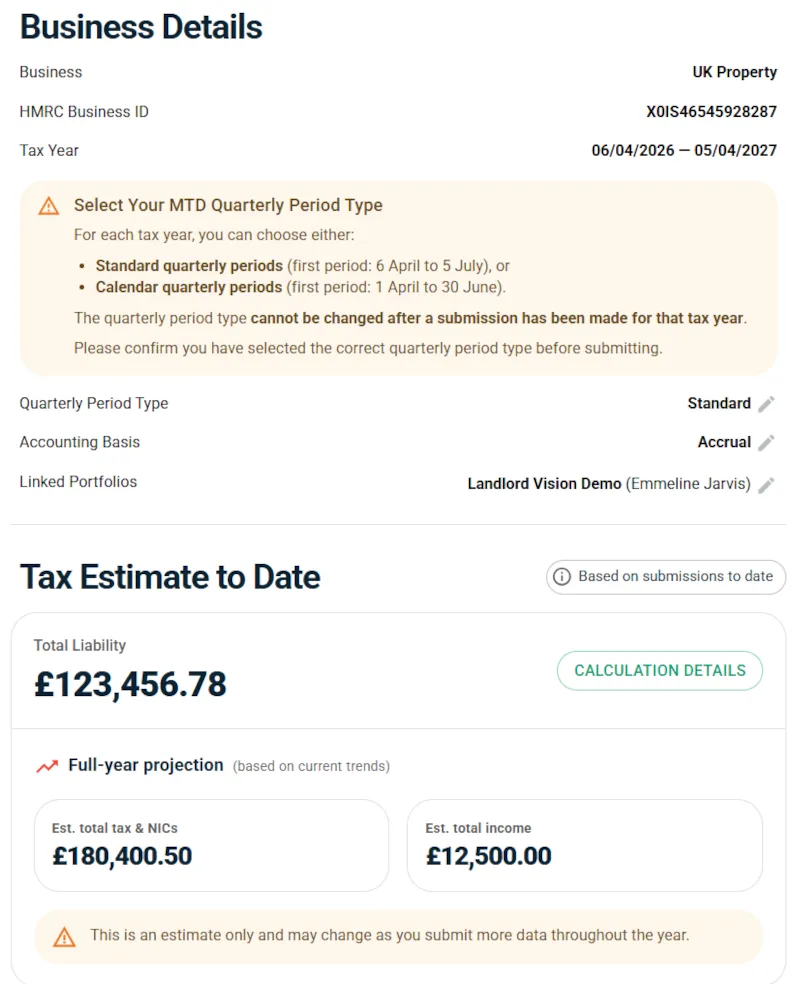
Screenshot: Map HMRC businesses to portfolios
3

Submit Quarterly Updates

Every quarter, Landlord Vision compiles your income and expense totals and lets you review them before submission. When you're happy, send the update to HMRC with a single click.

The four quarterly periods run: Apr–Jul, Jul–Oct, Oct–Jan, Jan–Apr. You'll have one month after each quarter ends to submit.
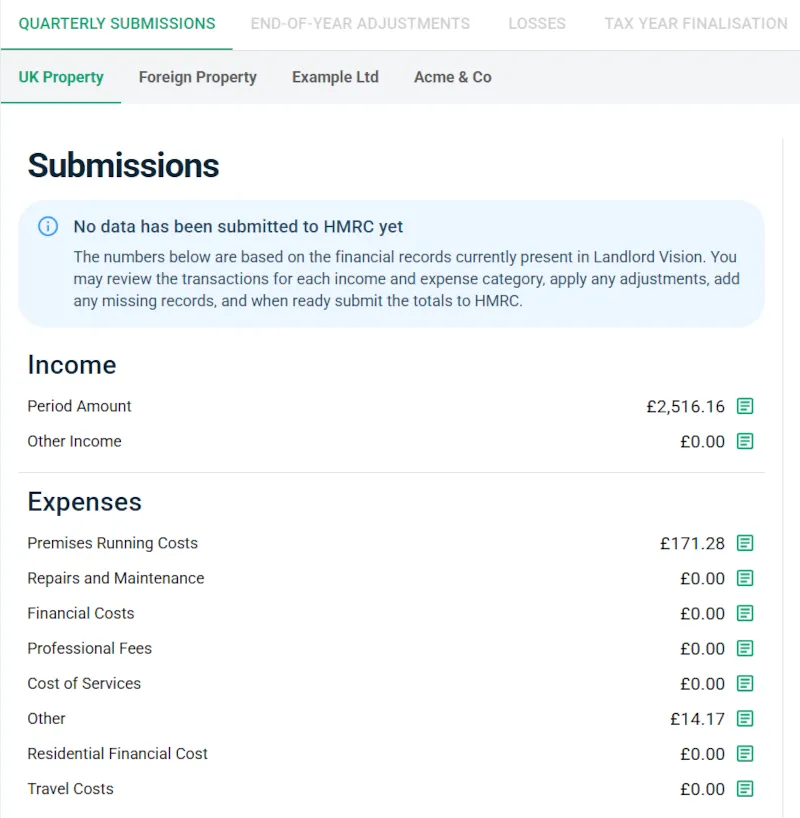
Screenshot: Quarterly submission review in Landlord Vision
4

End of Period Statement & Adjustments

At the end of the tax year, review your full-year figures. This is where you can make accounting adjustments — for example, capital allowances, private use adjustments, or any corrections to earlier quarters.

Landlord Vision presents your annual summary clearly so you can confirm everything is accurate before submitting your End of Period Statement (EOPS) to HMRC.
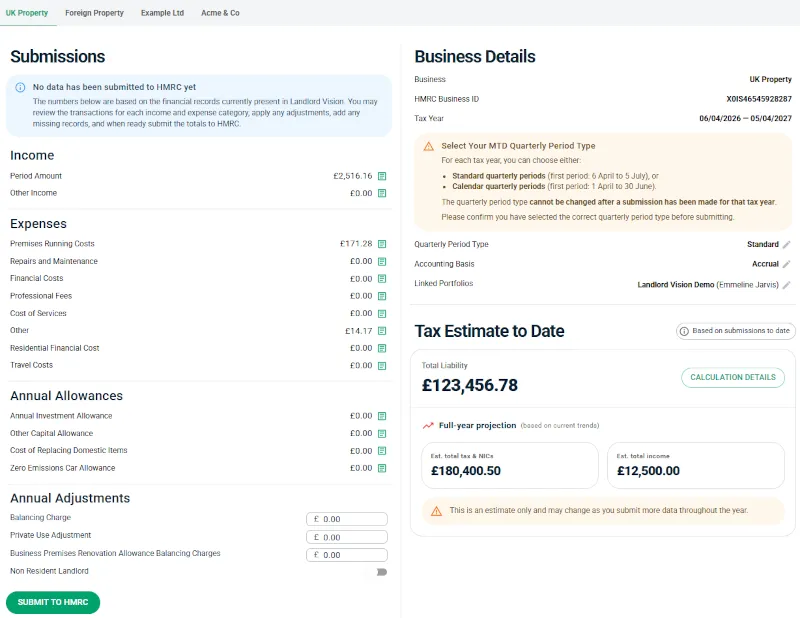
Screenshot: End of Period Statement with annual allowances and adjustments
5

Losses & Carry Forward

If your property business makes a loss in a given tax year, Landlord Vision lets you carry that loss forward to offset against future profits — reducing your tax liability in subsequent years.

The platform tracks your loss position so nothing gets missed when you file.
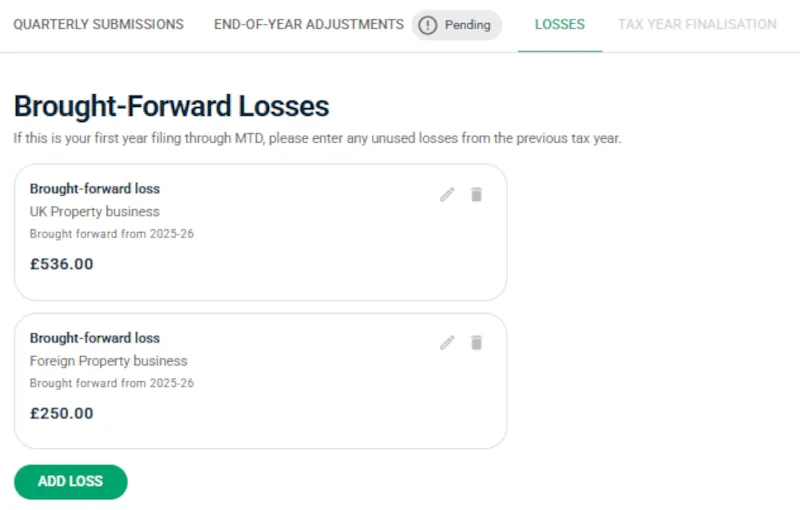
Screenshot: Brought-forward losses in Landlord Vision
6

Final Declaration

The Final Declaration is the last step — it replaces the traditional Self Assessment tax return. You confirm that all income sources have been reported and that your figures are complete and correct.

Once submitted through Landlord Vision, you're done for the year. HMRC has everything they need.
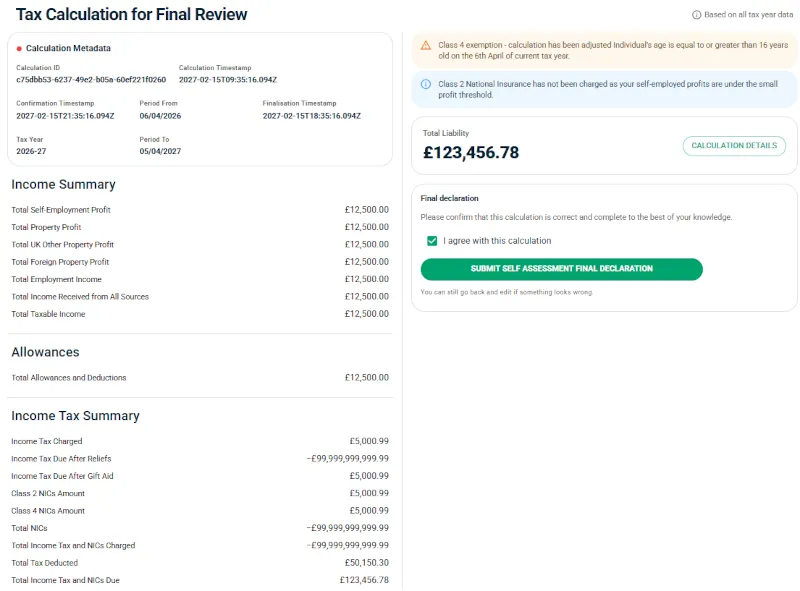
Screenshot: Tax calculation for final review and declaration

What is Making Tax Digital for Income Tax?

Making Tax Digital (MTD) for Income Tax is HMRC's programme to modernise how landlords and the self-employed report their income. Instead of filing a single Self Assessment tax return at the end of the year, you'll keep digital records and send quarterly updates to HMRC using recognised software.

The aim is to reduce errors, give you a closer-to-real-time view of your tax position, and replace the paper-based system with a streamlined digital process.

If you're a UK landlord with qualifying income above the threshold, MTD for Income Tax will be mandatory — not optional. Landlord Vision is built to make this transition seamless.

What Changes for You

Digital record keeping

All income and expenses tracked in HMRC-recognised software

Quarterly submissions

Send income and expense summaries to HMRC four times a year

End of Period Statement & Final Declaration

Confirm your annual figures and submit your tax position to HMRC

No more paper Self Assessment

MTD replaces the traditional annual tax return for qualifying landlords

Rollout Schedule

When Does MTD for Income Tax Start?

MTD for Income Tax is being rolled out in stages based on gross income. Phase 1 is already live — and Phase 2 is less than a year away.

Phase 1 — Live Now
6 April 2026
£50,000+
gross income per year

MTD is now mandatory for landlords and self-employed individuals with combined gross income above £50,000. If this applies to you, you should already be keeping digital records and submitting quarterly.

Phase 2 — Coming April 2027
April 2027
£30,000+
gross income per year

The threshold drops to include those with gross income between £30,000 and £50,000. Getting set up now means you'll be ready well ahead of time.

Phase 3
To Be Confirmed
Below £30,000
gross income per year

HMRC has indicated plans to extend MTD to lower income thresholds, but no date has been confirmed yet.

Not sure if you qualify?  Your gross income is the total property and/or self-employment income before expenses — not your profit. If your combined gross from all sources crosses the threshold, MTD applies to you.

Get MTD-Ready Before the Deadline

Phase 1 is live — MTD for Income Tax is now mandatory for landlords with gross income over £50,000. If you're not yet set up, there's still time to get compliant.

Common Questions About MTD

Here are a few of the most common questions we get. For the full list, visit our dedicated FAQ page.

What do I need to get started with MTD?

You'll need HMRC-recognised software like Landlord Vision, your Government Gateway login, and your income and expense records. Landlord Vision guides you through connecting to HMRC and mapping your property portfolios — most landlords are set up and ready to submit in minutes.

Is Landlord Vision officially recognised by HMRC?

Yes. Landlord Vision is officially recognised by HMRC as compatible software for Making Tax Digital for Income Tax. You can verify this on HMRC's list of recognised software providers.

What happens if I miss a quarterly deadline?

HMRC's new penalty regime uses a points-based system. Each late submission adds a penalty point — once you hit the threshold, a £200 penalty is triggered. Landlord Vision's submission reminders help you stay on track.

I'm below the threshold — should I prepare now?

It's a smart move. HMRC has signalled that lower thresholds will follow. Keeping digital records now means you'll already be compliant when your income bracket is included — plus you get real-time visibility of your tax position.

Still have questions?

Talk to Our Team

Call us on 01925 357 355 (Mon–Fri, 9am–5pm) or start your free trial to see MTD in action.

Trusted by thousands. Here’s what UK landlords have to say.

Why Landlord Vision Beats Spreadsheets and Generic Accounting Tools

MTD Requirement / Need

Landlord Vision (MTD-Ready)

Spreadsheets

Generic Accounting Tools

Digital Record-Keeping Automatically stores all income & expenses digitally and in the correct format for MTD Not MTD-compliant; manual and error-prone Digital, but requires manual setup to meet MTD landlord rules
Property-by-Property Accounting Built-in property structure ensures income/expenses are recorded correctly per property Requires complex formulas and high risk of misallocation Possible, but needs custom configuration and tagging
Accurate Income Categorisation Rent, fees, deposits, and reimbursements auto-categorised Manual entry only; prone to mistakes Categorises income, but not landlord-specific categories
Digital Expense Tracking Upload receipts, attach invoices, and store records for HMRC audits Requires manual uploads/linking; no audit control Digital receipts supported, but not linked to properties
Open Banking Integration Auto-reconciles transactions and keeps digital logs for MTD No integration Integrated, but not tied to landlord accounting workflows
MTD-Ready Tax Summaries Income/expense reports formatted for accountant or bridging software Must build manually Available, but requires adaptation for property income
Digital Audit Trail Automatic timestamped log of entries, perfect for HMRC reviews No audit trail unless manually created Exists, but not tied to property management activity
Ease of MTD Compliance Designed specifically for MTD for landlords → minimal setup Requires full manual build Requires landlord-specific customisation & understanding

Simple Pricing. Powerful Compliance.

All of our plans include full property management and MTD-ready accounting.
Every plan includes a free onboarding call and unlimited phone and email support* from our UK-based team. No robots. No ticket queues. Real people who know the product.
* Subject to our Fair Usage Policy.
Prices exclusive of VAT
Compare Plans
Book a demo See our MTD features live
How can we help?
Talk to us: 01925 357 355
9am to 5pm Monday to Friday
Get product support
Learning Lounge
Talk to us